YOUR PHOTO · A PERSONAL MEMORY
A Memorial Photo Phone Case: Choose the Picture That Feels Like Them
For a memorial photo phone case, start with a picture whose expression feels familiar, then check whether the face and the details you value remain clear in the case preview. The most formal portrait is not automatically the right one. VIBE IN CASE phone DIY is currently $35 per case, with standard shipping to eligible U.S. addresses and applicable sales tax included. Use an image you have permission to print, and review the selected model and layout before paying.
Create your photo case · $35 →VIBE IN CASE studio and secure checkout are hosted on moodincase.com.
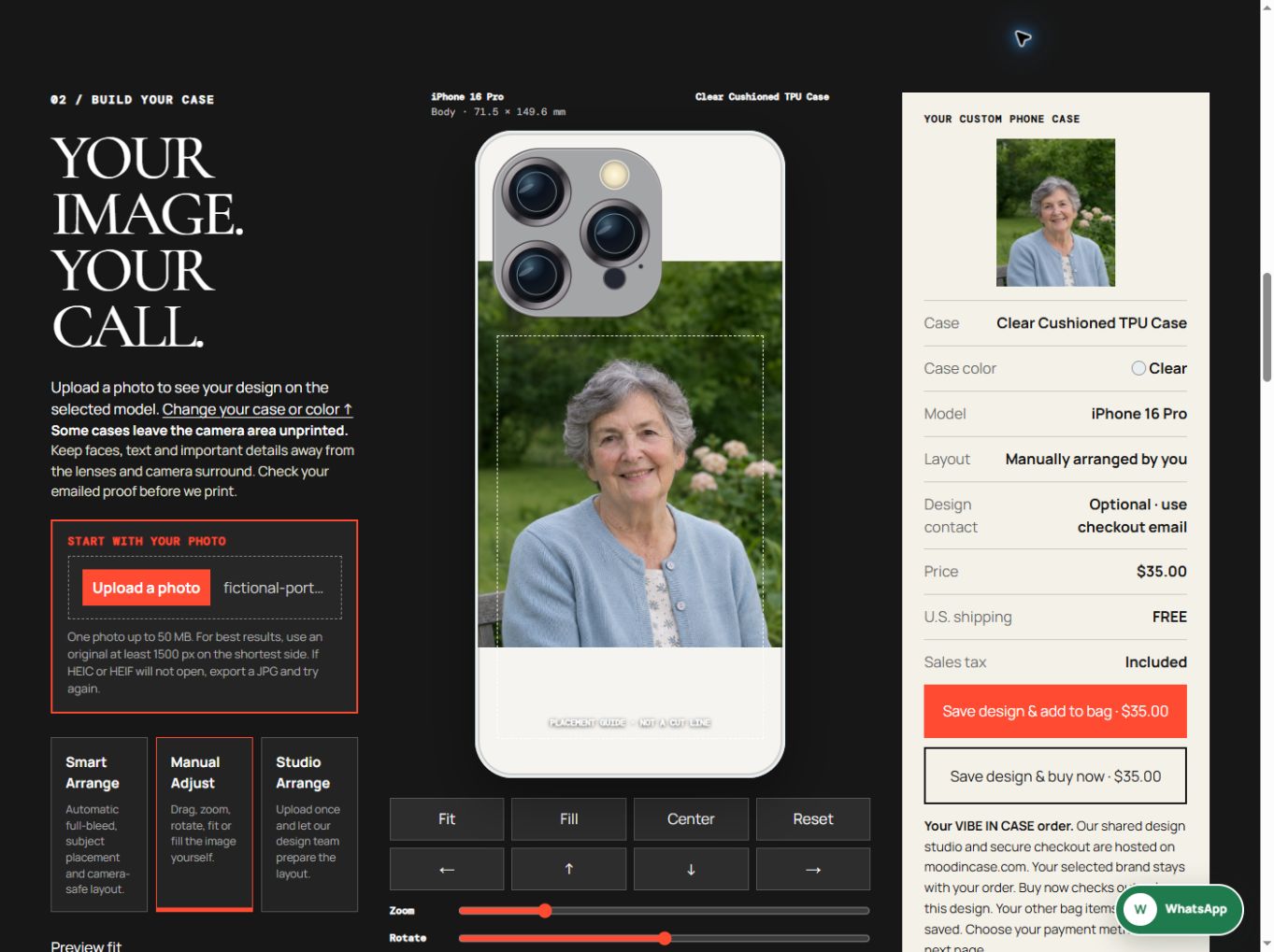
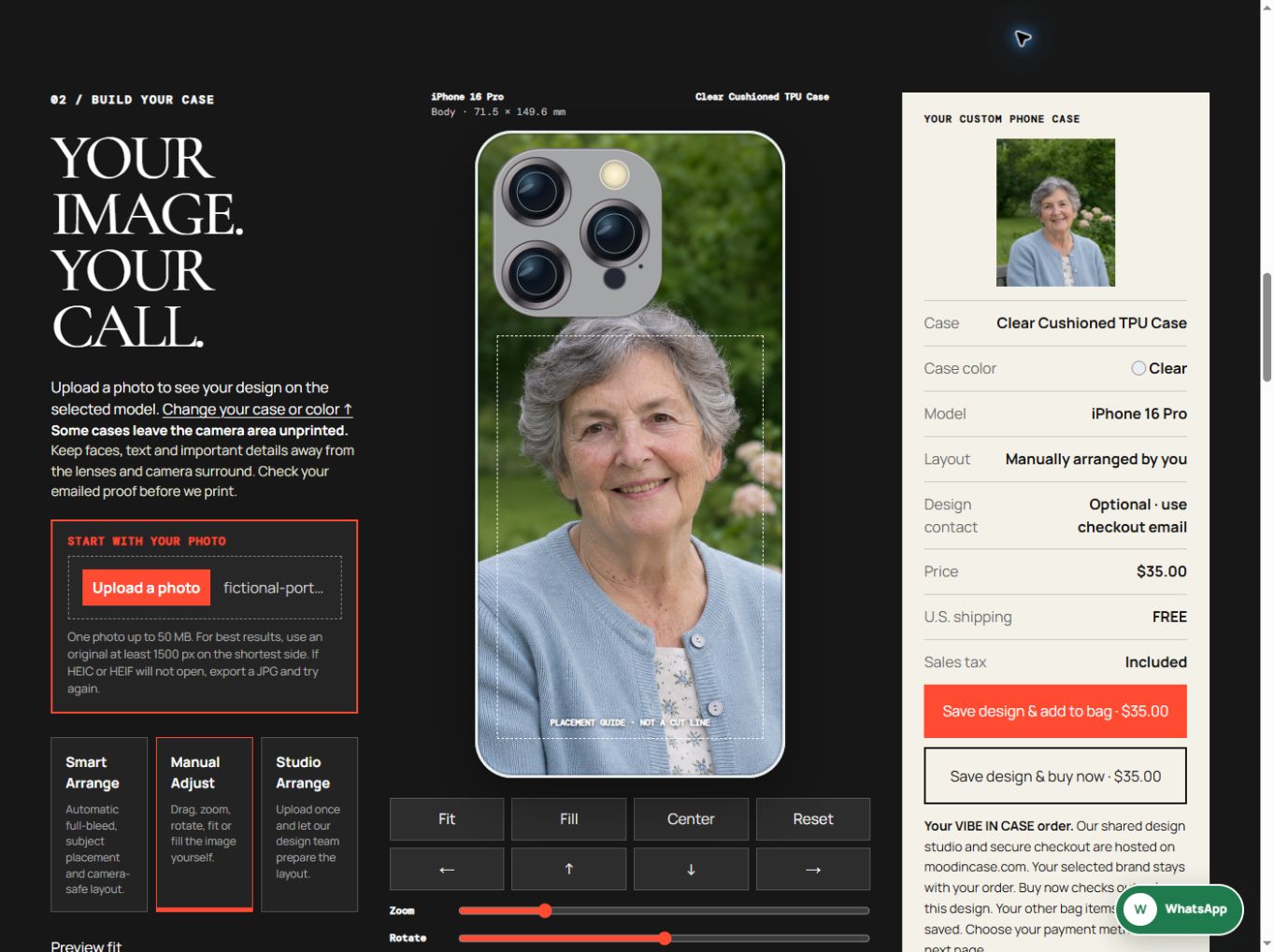
One fictional portrait, two actual editor layouts
The person is AI-generated teaching artwork, not a real customer or a historical family photograph. These are actual VIBE editor captures from November 18, 2026; they are placement previews, not photographs of printed cases.
Choose the expression before the decoration
A favorite everyday photograph can be a better starting point than the picture with the most formal pose. Look for the smile, glance or familiar way of sitting that makes you recognize the person. You do not need to turn the whole life story into one case. One image with a clear reason for choosing it can be enough.
Make a small shortlist before opening the editor. Ask yourself what you want to keep from each picture: the face, a favorite cardigan, the garden or a gesture. If you are making the case as a gift, first ask whether the recipient would like to carry a portrait on their phone. A memorial object is personal, and the preference matters more than keeping the gift a complete surprise.
Keep the original face and a separate working file
Look for the largest original file you can obtain. A family member may have the camera image even when the version in a group chat is small. Keep that original unchanged and make a separate copy for layout. If the only photograph available is an old print, first decide how you will obtain a clear digital copy; photographing or scanning it is a separate preparation step.
A brighter preview or a larger file cannot prove that missing facial detail has returned. Before using a heavily restored or generated version, compare it with the original eyes, smile and facial shape. If the person no longer looks familiar, the technically smoother file may not be the one you want to carry. The studio preview does not authenticate a likeness or perform historical-photo restoration.
The current upload control accepts one image up to 50 MB and recommends an original at least 1500 pixels on the shortest side. Treat that as preparation guidance, not a guarantee of print detail. Our teaching image is used to demonstrate placement, not to test print sharpness or represent a customer's family photograph.

Decide which surrounding detail belongs with the face
Sometimes the background carries part of the memory. A familiar chair or garden can matter as much as a perfect head-and-shoulders crop. In our fictional example, the pale blue cardigan, part of the bench and the garden flowers help give the portrait a setting. A tighter arrangement brings the face closer but removes more of that surrounding detail.
Compare the two actual editor captures above. They use the same image, iPhone 16 Pro, Clear Cushioned TPU Case and Clear selection. Fit leaves more of the complete image visible with space outside the photograph. Fill makes the face larger while cropping the side context. Neither is presented as a finished print, a cutout template or a screen-to-print color guarantee.
Use the difference to decide what matters in your own photograph. A closer face may be right for one image; a smaller portrait with the person's familiar surroundings may be right for another. Avoid judging the result only by how much of the case is covered. Read the expression and then look deliberately for the detail you said you wanted to keep.
Set the exact phone model before making the final crop
In the VIBE studio, select Phone DIY and choose the full model name. A Pro and a Pro Max are separate choices. Then choose the case style and color. Clear Cushioned TPU Case and Textured TPU Case are two current selector choices, but their names and screen previews do not establish a tested protection level or an exact physical color match.
Some cases leave the camera region unprinted. Keep the eyes, smile and any other essential detail away from the lenses, camera surround and outer edges. Inspect the selected model's camera layout. The preview guides your arrangement; the production shell still needs its matching cutouts. Recheck the portrait after changing the model, material or color rather than assuming the previous position remains suitable.
Make a small adjustment, then read the face again
Manual Adjust provides Fit, Fill, position, zoom and rotation controls. Start from the version that preserves what you value, then change one thing at a time. If the face needs more room, try moving the image before enlarging it again. Zooming can remove the cardigan, gesture or background you had chosen to retain without making that loss obvious at first glance.
If you want a name or short phrase, prepare it as part of the image before uploading and check spelling carefully. Do not assume the photo studio provides a text-entry tool. Keep any words large enough to judge in the preview and clear of the camera area. Dates, longer tributes and several small photographs can compete with the face; you can choose a portrait-only version instead.
Studio Arrange is available if you prefer the design team to prepare the composition from your uploaded image and instructions. Explain the detail that must remain, such as the complete smile or the hand on the chair. A production check is not a promise that every tiny detail from a low-resolution source can be recovered.
Check the person, the case and the order separately
Before continuing, compare the summary with the model, style, color and layout you selected. Check the current $35 phone price and the final order total. The VIBE design studio and secure checkout are hosted on moodincase.com; the page identifies the selected order as VIBE IN CASE. Follow the branded studio link from this guide so you can check that context before paying.
Use an email address that you can receive messages at and read the design-confirmation instructions shown in the studio. When reviewing the proof, check the expression, complete face, any lettering and camera clearance. If a personally meaningful detail has disappeared, ask about it before approving the design. Do not treat a large screen preview as the final production file.
Keep your original photo separately. A local browser draft is a convenience rather than an order or a cross-device backup. The demonstration for this guide did not submit a design to the production service, add a bag item, create an order or make a payment. When your own arrangement feels right, review it calmly before deciding to complete checkout.
Questions before you begin
Does a memorial photo case need a name or dates?
No. You can choose a portrait-only image. If you want words, prepare them in your image file and review their spelling and placement; do not assume the photo editor includes a text-entry tool.
Will the preview restore a blurred or damaged old face?
No. The preview helps with placement, scale and crop. It does not prove that missing detail has been recovered or that a restored image faithfully represents the original person.
Is the person shown in this guide a customer?
No. The source portrait is an AI-generated fictional teaching image. The case previews are actual VIBE editor captures, not printed products, customer photographs or buyer reviews.
Keep the detail you recognize
Have your own original file ready, then check the face, selected model and complete composition in the VIBE studio.
Create your memorial photo case · $35 →