CHECK THE LINE BEFORE THE CROP
Should You Straighten a Tilted Horizon Before Making a Photo Phone Case?
Photo phone DIY · $35 per case
Create your photo case
Straighten a horizon if the tilt is accidental and keeps pulling your attention away from the picture. Keep it tilted if the angle is intentional and part of the feeling you want. Make that decision before committing to a tight phone-case crop, because rotating a picture can change which edges remain visible. Keep the original and compare a separate edited copy. VIBE IN CASE photo phone cases currently cost $35 each.
Look for a reference line, not a rule to obey
A distant sea horizon is a useful reference because you can follow it across the picture. A skyline is more complicated: building edges, hills and the camera perspective do not necessarily form one straight line. Look at what you actually photographed rather than forcing every roof or shoreline to match the top of the screen.
Ask a simple question at normal viewing size: does the picture look unintentionally tipped, or does the diagonal make the composition feel more alive? Neither answer is a quality certificate. A deliberately angled travel snapshot may be exactly the memory you want, while a quiet sea view may work better with a calmer reference line. The choice should come from the source image, not a promise that one angle prints better.
Keep an original and make one small change
Duplicate your own photo before using a straighten or rotation control in a photo editor. Keep the unedited file separately, especially if the copy has already been cropped or shared through a messaging app. Saving another copy lets you compare without repeatedly overwriting the only version that contains the full scene.
Use the smallest adjustment that addresses the distracting tilt. Then reopen the saved copy and inspect its corners and edges. Some editors crop after rotation; others leave empty areas for you to handle. Do not assume the whole original frame survived. Check a headland, a person near an edge, the top of a building and any small detail you wanted to keep.
Rotation and cropping solve different problems
Rotation changes the direction of the picture. Cropping changes how much of it you see. Enlarging the image may cover an empty corner after rotation, but it can also remove more of the scene. That trade-off is why an apparently small alignment adjustment deserves a second look before you turn the image into a tall case design.
If the important subject is close to the frame edge, compare the edited copy with the original before uploading. You might prefer a slight tilt to losing that subject. Another option is to keep more breathing room around the picture. Do not enlarge a soft image just to disguise a crop problem: zooming cannot recreate detail that is missing from the file.
What the two images here do—and do not—show
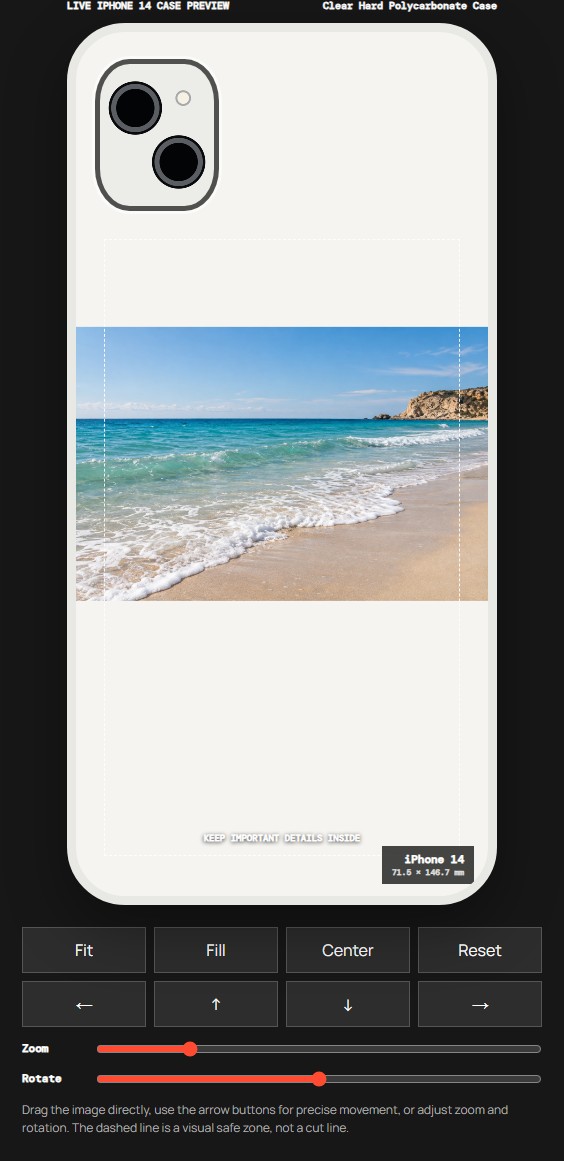
The first image is our existing AI-created coastal demonstration scene. Its visible sea horizon gives you a reference line to inspect. The second is an actual VIBE IN CASE editor capture made from that scene on September 24, 2026, with Clear Hard Polycarbonate Case and iPhone 14 selected. It shows the relationship between a horizontal scene and a tall placement preview.
These are reused, clearly dated teaching references, not a new before-and-after straighten test. We have not measured a print improvement, demonstrated automatic horizon correction or photographed a finished customer case. Use the images to understand what to check; your result starts with the file you have permission to use.
Select the case and model before judging the final layout
Open the VIBE IN CASE studio and choose your material and exact phone model first. Clear Hard Polycarbonate Case and Clear Flexible TPU Case are currently listed options. The model list depends on the construction you choose, so do not treat a material name as evidence that every phone is supported.
The current studio accepts PNG, JPG or WebP files up to 12 MB. Upload the original or the separate edited copy you chose, then use Manual Adjust to review its placement. The editor has a Rotate control, but a placement control is not a guarantee of automatic straightening. Review the visible result yourself after any adjustment.
Recheck the horizon after every framing change
Look at the preview at a comfortable everyday size. Check the direction of the horizon, the camera opening and the outer edge together. A picture that looked balanced in your photo app can feel different inside a narrow case shape. Important details should not depend on a tiny sliver at the edge remaining visible.
If you change the zoom, material or model, review the composition again. Camera and edge outlines are approximate placement guides, not factory cutting templates. The studio performs production preflight, but the on-screen preview is still not a promise of exact printed color, precise final crop or recovered image resolution.
Ask for a specific placement decision
If you prefer Studio Arrange, explain what matters: “keep the sea horizon close to level and retain the headland,” or “keep the deliberate diagonal and do not crop the person on the left.” A specific instruction is more useful than asking the team to improve the photo without saying which part you want to preserve.
Use your own image or an authorized file. Do not upload customer artwork, private messages or another person's personal photo merely to illustrate a question. If the picture includes people, addresses or other sensitive details, decide what you have permission to use before starting the design.
Review one design before ordering
When the composition feels right, review the selected model, material, brand and quantity before proceeding. The VIBE IN CASE editor is intentionally hosted at moodincase.com/vibe-custom as part of the shared studio and checkout. Look for the VIBE IN CASE label so you know you are working with the right brand.
Read the current order summary and shipping and returns information for the terms that apply. Decide whether the angle, crop and visible details are right for you before saving the design. If you want help comparing how much of a wide image remains visible, our separate Fit and Fill guide covers that framing question.
Before you start
Must every horizon be perfectly level?
No. Straighten an accidental tilt when it distracts from the scene, but keep a deliberate angle if it is part of the image you want to carry.
Will rotating a photo recover missing edges?
No. Rotation changes placement and can expose empty corners or require more cropping. Compare the result with the original before saving.
Does this guide demonstrate a finished printed case?
No. The scene is AI-created and the dated editor capture is a placement reference, not a customer photo, production sample or measured printing test.